









BLOG
Why Do USB PD 3.0, PPS, and 5V-to-20V Output Profiles Matter in 65W USB-C Adapters?
QUICK LINKS
What does USB PD 3.0 mean in a 65W USB-C adapter?
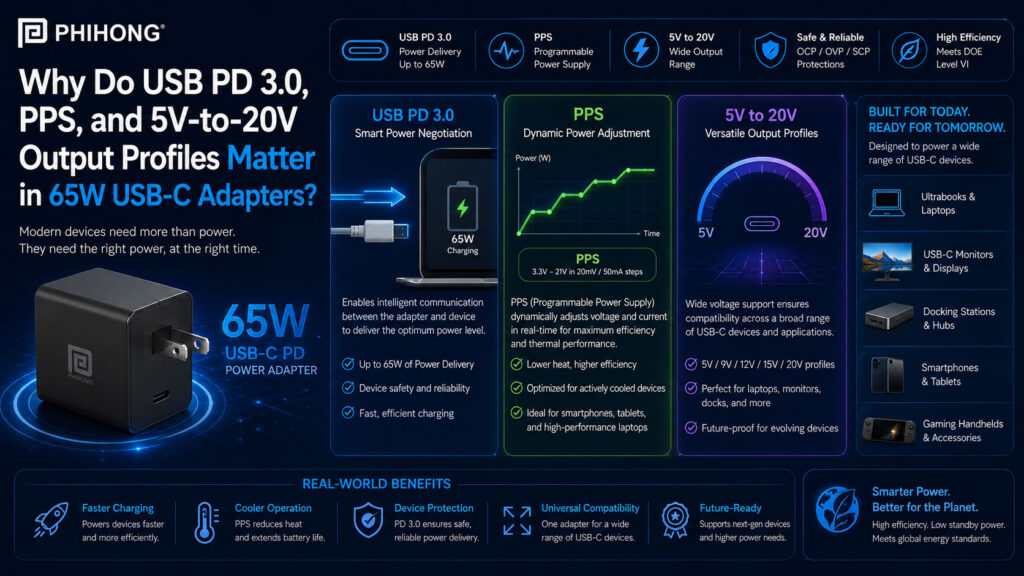
USB Power Delivery 3.0, often shortened to USB PD 3.0, is the communication and power-negotiation system that helps a USB-C adapter and device agree on the correct charging voltage and current. Instead of delivering only one fixed output, a USB-C PD adapter can advertise multiple power profiles. The connected device then requests the profile it supports. This is what allows one 65W USB-C adapter to power different devices such as laptops, tablets, portable monitors, docking accessories and other USB-C equipment.
For OEMs, USB PD 3.0 matters because compatibility depends on more than the connector shape. Two products can both use USB-C, but still have different power requirements. A device may need 20V for laptop-class charging, 15V for a monitor, 9V for a smaller system, or 5V for lower-power operation. Phihong’s 65W USB-C PD adapter options, including the AQ65A-59FKB-R wall-mount format and AA65M-59FKB-R desktop format, give OEM teams examples of 65W USB-C PD 3.0 adapter platforms with multiple voltage profiles for different product requirements.
| USB PD 3.0 Area | Why It Matters | What OEM Teams Should Review |
|---|---|---|
| Power negotiation | Adapter and device agree on a supported power profile. | Device sink behavior, PD controller, firmware and charging states. |
| Multiple output profiles | One adapter can support several voltage levels. | 5V, 9V, 15V, 20V and whether PPS is required. |
| 65W power level | Supports many laptops, tablets, displays and USB-C peripherals. | Maximum power demand, cable rating, thermal behavior and margin. |
| USB-C does not equal compatibility | Connector type alone does not guarantee correct power delivery. | PD support, cable type, profile match and validation results. |
Why This Matters
• USB PD 3.0 helps a 65W USB-C adapter deliver the correct profile for different device types.
• OEMs should validate PD negotiation instead of assuming every USB-C device will charge correctly from every USB-C adapter.
What OEMs Should Do Now
• Confirm the device’s required USB-C PD profiles before selecting the adapter.
• Test the adapter, cable and device together across startup, sleep, full-load and low-battery charging conditions.
Useful Links
AQ65A-59FKB-R Product Page: www.phihong.com/products/adapters/aq65a-59fkb-r/
AA65M-59FKB-R Product Page: www.phihong.com/products/adapters/aa65m-59fkb-r/
Power Adapter Product Line: www.phihong.com/products/adapters/
Related Links
Best Guide to 65W USB-C PD Adapters: Wall-Mount, Foldable, Interchangeable, and Desktop Formats Explained: www.phihong.com/best-guide-to-65w-usb-c-pd-adapters-wall-mount-foldable-interchangeable-and-desktop-formats-explained/
Wall-Mount vs Desktop 65W USB-C Adapters: Which Format Fits Laptops, Monitors, and Docking Stations?: www.phihong.com/wall-mount-vs-desktop-65w-usb-c-adapters-which-format-fits-laptops-monitors-and-docking-stations/
FEATURED PRODUCTS
AM250U-540AP-R
AA240U-200A-R
AA240U-200B-R
AA280U-200B-R
AA240U-59FKEA-R
AA36U-240B-R

Why do 5V, 9V, 15V, and 20V output profiles matter?
The 5V, 9V, 15V and 20V output profiles matter because different USB-C devices are designed to operate or charge at different voltage levels. A small accessory may only need 5V. A tablet or compact system may use 9V or 15V. A laptop, portable workstation accessory, docking station, or higher-power USB-C device may require 20V to reach the intended power level. The output profile determines whether the device can receive the voltage it expects.
In a 65W USB-C adapter, 20V is especially important because 65W typically requires a higher-voltage profile with an appropriate current level. Phihong’s AQ65A / AQ65E / AQ65K family and AA65M-59FKB-R desktop format provide examples of 65W USB-C PD adapters listing 5V, 9V, 15V and 20V output modes. For OEM teams, the key question is whether the powered device correctly negotiates the intended profile through the approved cable and controller configuration.
| Output Profile | Common Compatibility Role | What OEM Teams Should Review |
| 5V | Lower-power USB-C devices and baseline operation. | Startup behavior, fallback charging and accessory support. |
| 9V | Mid-power devices, accessories and some charging modes. | Device request behavior, current limit and thermal condition. |
| 15V | Tablets, portable displays, compact systems and intermediate power needs. | Load demand, charging stage and cable compatibility. |
| 20V | Laptop-class and higher-power 65W USB-C operation. | 20V negotiation, current level, cable rating and full-load validation. |
Why This Matters
• 65W compatibility depends on whether the adapter and device agree on the correct voltage profile.
• A USB-C connector alone does not confirm that the device will receive the power level it needs.
What OEMs Should Do Now
• Match the device’s required voltage profile with the adapter’s advertised PD output modes.
• Validate behavior with the intended USB-C cable, device firmware, low-battery condition and maximum system load.
Useful Links
AQ65A / AQ65E / AQ65K Datasheet: www.phihong.com/wp-content/uploads/New-datasheet-AQ65A-59FKB-R-AQ65E-59FKB-R-AQ65K-59FKB-R_01022026.pdf
AA65M-59FKB-R Product Page: www.phihong.com/products/adapters/aa65m-59fkb-r/
Contact Phihong: www.phihong.com/contact
Related Links
Why 65W GaN Power Adapters Are Becoming the New Standard for Commercial Laptops: www.phihong.com/why-65w-gan-power-adapters-are-becoming-the-new-standard-for-commercial-laptops/
Best Guide to GaN Power Adapters: What Modern Devices Need From Compact, High-Density Power: www.phihong.com/best-guide-to-gan-power-adapters-what-modern-devices-need-from-compact-high-density-power/
What is PPS and why does it matter for USB-C device compatibility?
PPS stands for Programmable Power Supply. In USB-C PD charging, PPS allows the adapter and device to negotiate more flexible voltage and current behavior than fixed voltage profiles alone. Instead of only using set levels such as 5V, 9V, 15V, or 20V, PPS can support adjustable voltage ranges when both the adapter and device support the feature. This can be useful for devices that manage charging more dynamically.
PPS should not be treated as automatically required for every USB-C product. Some devices only need fixed PD profiles. Others may use PPS to support more refined charging behavior. Phihong’s AQ65A-59FKB-R product page lists PPS 3.3V–21V support, and the AA65M-59FKB-R page lists PPS support for its 65W USB-C PD 3.0 desktop format. For OEMs, the practical issue is whether the powered device actually requests PPS and whether the adapter, cable and device controller behave predictably under the intended operating conditions.
| PPS Question | Why It Matters | What OEM Teams Should Review |
| Does the device need PPS? | Not every USB-C product requires programmable output. | Device charging architecture, battery profile and controller requirements. |
| What voltage range is supported? | PPS compatibility depends on supported operating range. | PPS range, current limits, firmware behavior and cable rating. |
| How does the device negotiate? | Device-side controller behavior determines the requested profile. | Sink controller, firmware, fallback modes and edge cases. |
| What happens without PPS? | Some devices may fall back to fixed PD profiles. | Charging speed, compatibility, customer experience and support language. |
Why This Matters
• PPS can improve compatibility for devices that require programmable charging behavior, but it is not automatically necessary for every USB-C device.
• OEMs should verify whether the device uses fixed PD profiles, PPS, or both.
What OEMs Should Do Now
• Confirm whether the product requires PPS or can operate properly using fixed USB PD 3.0 profiles.
• Test PPS negotiation, fallback behavior, cable compatibility and full-load operation with production-intent hardware.
Useful Links
AQ65A-59FKB-R Product Page: www.phihong.com/products/adapters/aq65a-59fkb-r/
AA65M-59FKB-R Product Page: www.phihong.com/products/adapters/aa65m-59fkb-r/
Power Adapter Product Line: www.phihong.com/products/adapters/
Related Links
Fixed-Blade vs Interchangeable 65W USB-C Adapters: Which Format Works Better for Global Product Deployment?: www.phihong.com/fixed-blade-vs-interchangeable-65w-usb-c-adapters-which-format-works-better-for-global-product-deployment/
Why Are Foldable 65W GaN Adapters Better for Travel-Ready Laptops and USB-C Devices?: www.phihong.com/why-are-foldable-65w-gan-adapters-better-for-travel-ready-laptops-and-usb-c-devices/
CLIENT'S QUOTE
Phihong’s custom OEM power solutions have transformed our product development, boosting performance and reducing overhead. Their expert engineering support has simplified both the design and manufacturing phases.
How do USB PD profiles affect laptops, tablets, monitors, and docking stations?
USB PD profiles affect compatibility because different devices request different voltage and current combinations. A laptop may need a 20V profile to reach its intended charging level. A tablet may use a lower voltage profile or PPS depending on its charging architecture. A portable monitor may require 15V or 20V depending on brightness, USB-C display behavior and connected accessories. A docking station may need stable power delivery to support multiple downstream devices.
This is why OEM teams should avoid treating 65W as one universal answer. A 65W USB-C adapter can be a strong fit only when the adapter’s advertised profiles match the device’s input requirements. The adapter, USB-C cable, device-side controller and firmware all participate in the negotiation. If one piece is mismatched, the device may charge slowly, fall back to a lower power mode, fail to charge under load, or create unnecessary customer support issues.
| Device Type | Why USB PD Profiles Matter | What OEM Teams Should Review |
|---|---|---|
| Laptop | Often needs higher-voltage profiles to reach 65W-class charging. | 20V support, current requirement, cable rating and charge-under-load behavior. |
| Tablet | May use fixed PD profiles or PPS depending on charging design. | PPS requirement, fallback behavior, battery state and thermal limits. |
| Portable monitor | Power draw can change with brightness and USB-C display mode. | 15V / 20V requirements, display load and connected device behavior. |
| Docking station | Must support stable power for multiple connected functions. | Host charging, downstream ports, power budget and transient behavior. |
Why This Matters
• Device compatibility depends on the exact USB PD profile requested, not only the adapter’s maximum wattage.
• Laptops, tablets, monitors and docks may behave differently even when they all use USB-C.
What OEMs Should Do Now
• Document the device’s required fixed profiles, PPS behavior and fallback modes before choosing the adapter.
• Test charging under realistic use conditions, including low battery, full load, sleep mode and connected peripherals.
Useful Links
AA65M-59FKB-R Product Page: www.phihong.com/products/adapters/aa65m-59fkb-r/
AQ65A-59FKB-R Product Page: www.phihong.com/products/adapters/aq65a-59fkb-r/
Contact Phihong: www.phihong.com/contact
Related Links
Wall-Mount vs Desktop 65W USB-C Adapters: Which Format Fits Laptops, Monitors, and Docking Stations?: www.phihong.com/wall-mount-vs-desktop-65w-usb-c-adapters-which-format-fits-laptops-monitors-and-docking-stations/
Fixed-Blade vs Interchangeable 65W USB-C Adapters: Which Format Works Better for Global Product Deployment?: www.phihong.com/fixed-blade-vs-interchangeable-65w-usb-c-adapters-which-format-works-better-for-global-product-deployment/
How Phihong supports 65W USB-C PD compatibility for OEM device programs
Phihong’s 65W USB-C PD adapter options help OEM teams match electrical requirements with product format needs. The AQ65A / AQ65E / AQ65K wall-mount family supports 65W USB-C PD 3.0 output with fixed voltage profiles and PPS support, making it relevant for portable and regional wall-plug product bundles. The AA65M-59FKB-R desktop adapter provides a corded 65W USB-C PD 3.0 format with C6 input, making it useful for monitors, docking stations and desk-based commercial equipment.
For OEM engineers and product managers, the selection process should connect USB-C PD behavior with physical adapter format. A product may need 65W power, but it also needs the right voltage profile, PPS behavior, cable rating, plug format, regional strategy, thermal behavior, EMI documentation and customer support plan. Phihong’s 65W adapter family gives teams multiple paths for matching USB-C PD compatibility with the way the final device is used.
| Phihong Selection Area | Why It Helps OEM Teams | What Teams Should Review |
| AQ65A / AQ65E / AQ65K | Supports regional wall-mount 65W USB-C PD adapter formats. | Plug format, fixed PD profiles, PPS support and deployment region. |
| AA65M-59FKB-R | Supports desktop 65W USB-C PD adapter integration. | C6 input, cord strategy, device placement and cable routing. |
| USB PD 3.0 profiles | Helps match adapter output to device charging requirements. | 5V, 9V, 15V, 20V, PPS and device-side negotiation. |
| OEM validation | Confirms compatibility before product launch. | Cable, firmware, load profile, thermal behavior and customer support language. |
Why This Matters
• Phihong’s 65W USB-C PD adapter options help OEMs match output profiles with device compatibility requirements.
• USB-C adapter selection should include electrical negotiation, physical format, regional deployment and support planning.
What OEMs Should Do Now
• Compare the device’s required USB PD profiles against the adapter’s advertised output modes before final selection.
• Contact Phihong to discuss 65W USB-C PD adapter requirements for laptops, monitors, docks and other USB-C devices.
Useful Links
AA65M-59FKB-R Product Page: www.phihong.com/products/adapters/aa65m-59fkb-r/
AQ65A-59FKB-R Product Page: www.phihong.com/products/adapters/aq65a-59fkb-r/
Power Adapter Product Line: www.phihong.com/products/adapters/
Related Links
Best Guide to 65W USB-C PD Adapters: Wall-Mount, Foldable, Interchangeable, and Desktop Formats Explained: www.phihong.com/best-guide-to-65w-usb-c-pd-adapters-wall-mount-foldable-interchangeable-and-desktop-formats-explained/
Why 65W GaN Power Adapters Are Becoming the New Standard for Commercial Laptops: www.phihong.com/why-65w-gan-power-adapters-are-becoming-the-new-standard-for-commercial-laptops/
USB PD 3.0, PPS and 5V-to-20V output profiles matter because USB-C compatibility is negotiated, not assumed. The adapter and device must agree on the correct power profile, and that profile must support the device’s real charging and operating behavior.
For OEM teams, the right 65W USB-C adapter is the one that matches the device’s electrical requirements and the product’s physical format. Teams should validate fixed profiles, PPS behavior, cable compatibility, firmware behavior, thermal performance and customer support scenarios before production. If your team is selecting a 65W USB-C PD adapter for a laptop, monitor, docking station, tablet, or commercial USB-C device, contact Phihong to discuss your application.

CONTACT US TODAY
From concept to production, Phihong delivers custom OEM power solutions tailored to your specifications.
FAQ
What does USB PD 3.0 mean in a 65W USB-C adapter?
USB PD 3.0 is the power negotiation system that allows a USB-C adapter and device to agree on supported voltage and current levels. In a 65W adapter, this often includes profiles such as 5V, 9V, 15V and 20V. The device requests the profile it can use. OEM teams should validate this negotiation with the final device, cable and firmware instead of assuming all USB-C products behave the same way.
Why do 5V, 9V, 15V and 20V profiles matter?
These profiles allow one USB-C adapter to support different types of devices. Lower-power accessories may use 5V, while tablets or compact devices may use 9V or 15V. Laptop-class 65W charging often depends on the 20V profile. If the device and adapter do not share the right profile, charging may be limited, slower, or unsupported under full-load conditions.
What is PPS in USB-C charging?
PPS stands for Programmable Power Supply. It allows compatible adapters and devices to negotiate more flexible voltage and current behavior than fixed profiles alone. Some devices use PPS for more dynamic charging control, while others rely only on fixed USB PD profiles. OEM teams should confirm whether PPS is required by the device and test fallback behavior if PPS is not used.
Does every 65W USB-C device need PPS?
No. PPS is useful for some devices but not mandatory for every 65W USB-C product. Many products can operate properly using fixed USB PD profiles if those profiles match the device’s requirements. The important step is to confirm the device’s charging architecture, controller behavior and firmware expectations before choosing the adapter.
Why can two USB-C chargers behave differently with the same device?
Two USB-C chargers can behave differently because they may advertise different PD profiles, PPS ranges, current limits, firmware behavior, cable assumptions, or protection behavior. The device may request one profile from one adapter and a different fallback profile from another. This is why OEMs should test the exact adapter, cable and device combination intended for production.
What should OEMs test before choosing a 65W USB-C PD adapter?
OEMs should test USB PD negotiation, fixed profiles, PPS behavior if required, cable rating, connector temperature, charge-under-load behavior, low-battery behavior, sleep and wake states, thermal performance, EMI, safety documentation and customer support scenarios. Testing should use production-intent hardware, firmware and cables whenever possible.
POE technology supports the centralization of power

AC Adapter Guide: Everything You Need to Know
Moreover, PoE technology supports the centralization of power management. By powering devices through a PoE-enabled network …
AC DC Power Chargers and How They Work: A Comprehensive Technical Breakdown
Moreover, PoE technology supports the centralization of power management. By powering devices through a PoE-enabled network …

USB-C Charger: Shaping the Future of the Tech World
Moreover, PoE technology supports the centralization of power management. By powering devices through a PoE-enabled network …

AC Adapter Guide: Everything You Need to Know
Moreover, PoE technology supports the centralization of power management. By powering devices through a PoE-enabled network …

AC DC Power Chargers and How They Work: A Comprehensive Technical Breakdown
Moreover, PoE technology supports the centralization of power management. By powering devices through a PoE-enabled network …

USB-C Charger: Shaping the Future of the Tech World
Moreover, PoE technology supports the centralization of power management. By powering devices through a PoE-enabled network …